contents | gnulinux | writing | design | workshops | consulting | more                      


Archive for the ‘design’ Category

ComicCon 2012: Delhi

Sunday, February 19th, 2012

I just spent half a day at ComicCon 2012 in Delhi today. That’s the annual Comics convention and celebration, held for the second time in India. Here is a link to some photos with descriptions of the event. ComicCon 2012

Note to Self: A Whole New Galaxy of Creativity

Monday, January 23rd, 2012

At last, the first smart phone for creative people is here: The Samsung Galaxy Note.

Circle This

What is the one, exclusive, killer-feature of the Samsung Galaxy Note that endears it, right out of the box, to creative professionals like me? The pure simplicity with which I can open any web-design or user-interface screen, encircle elements and scribble over them with a stylus pen. Then add notes to it, and send it across to my colleagues or clients. That’s it. And what’s the next? The legendary use of the paper napkin for scribbling logo designs for startups and million-dollar companies can now move to a digital incarnation, in this the second decade of the 21st century.

How to Handle Pressure

Turns out there’s lots a creative professional can do with this smartphone. The stylus is pressure-sensitive. Hence it mimics shades, tints, and variations of shapes and shades as you draw, sketch, and illustrate. The screen-resolution of 1280 x 800 pixels equals the resolution of most netbooks, so you can assess how your designs will render in that ratio. But what’s really impressive, is that the 1280 x 800 resolution fits into a dazzling super-AMOLED screen of just 5.3 inches, in 16 million vibrant colors, at a pixel-density of 285ppi. My first Mac in 1985, had a 9-inch black and white screen, at 72 ppi. Which is why the world is still stuck to the  now mythical 72ppi. Grow up, people.

I love the rendering of fonts on this display. Reading books and periodicals is such a joy. Have just been looking for fonts and typography apps to relish the crispness of typography. Those of you who’ve grown up with the coarseness of mobilephone font-renderings that lasted nearly 15 years, will know what I mean here. This phone makes owning the Kindle Fire redundant. I’ve got the Amazon app here, plus a few more apps for eBooks and magazines. But it’s the feel of typography, the comfort and smoothness and attention-to-detail that my much-neglected eyes experience with this display.

The large screen manages HD video playback with no latency or dropped-frames, thanks to its dual-core 1.4 Ghz ARM Cortex chip. You read that right, this beauty comes with a dual-core CPU. Plus a Mali-400MP Graphics Processor Unit. The result is a smartphone not just for authoring, but for pure inspiration. I have a live wallpaper with floating fish in a pond. A tap or a touch on the screen creates ripples and refraction-effects in the water that is just breathtaking.


All this consumes battery. The Note ships with a Li-On 2500 mAh battery. That’s huge. But given the bandwidth-leech that I’ve become, and the heavy geeky use that I extract from all my devices, it’s surprising how the battery lasts a day for me, and sometimes more. your mileage will vary. Mine does, every day. I carry my micro-USB cable with me in my laptop bag, have a separate charger in the car, and generally move to places not far from the grid. Knowing how to throttle your power-consumption is an art every geek must know, and it’s not just true for this phone. Secondly, with the growing gaggle of gadgets I find myself carrying every day, I’ve decided to invest in a battery power-brick. Am still deciding on an Amzer or an Eto, or something else. Given the abundant sunshine I get in the Indian capital, I’ll settle for the one with the added solar-panel, like the Amzer.

Is it a phone for folks like Sudev Barar, who tend to motor their muscle-cars out into the Indian sub-continent’s harsh climates and tend to veer off far away from the grid? As a GPS device mounted inside the car, most definitely yes. Digital-freedom lovin’ folk like Sudev will especially appreciate its support for both A-GPS and GLONASS. Though rather unfortunately named, GLONASS is what you’ll run to should the powers-that-be decide to abruptly switch off your access to GPS satellites and imagery and ask you to kiss their ass. I have yet to play around with GLONASS, but I hope Sudev does us all the honour of a thorough testing of GLONASS on the Samsung Note with his sojourns across the majestic terrains of our sub-continent.

The in-built video-editing software is another marvel of engineering and software interface-design. I could never have imagined non-linear video-editing would come down from its lofty heights of high-end workstations costing millions of dollars and several hundred thousands of dollars in training, to handheld devices for folks to use with nothing more than a swipe and a thumb. Am utterly overwhelmed here.

Sentimental Note for the Newton

Then there’s the handwriting recognition. I must admit, the moment I unboxed the Samsung Galaxy Note, a wave of nostalgia overwhelmed me. I went back to the time I unboxed my Apple Newton 120 in circa 1997. Having endured the idiosyncrasies of the Apple Newton’s infamous handwriting recognition engine, I found myself delighted with the generations of evolution am inheriting here. It’s been just three days with the Note, and I’ve eagerly abandoned all other forms of input, and am always tapping and scribbling furiously away with my stylus. I hope I soon forget how to use QWERTY keypads on mobile-screens. The arrow of technology is going to come full-circle. At least for me. So far, all my new contacts, memo notes, expense sheets, web-forms, emails, text-messages, and other forms of verbose text are handled entirely using the handwriting recognition of the stylus.

Okay, I know, I do need to write another blog-post, in which I’ll share all the apps and widgets I use, plus the techniques and workflows, for handling some aspects of professional user-interface and UX design on the Galaxy Note. Pause, I’ll just make a note of this. There! I’m back.

Let’s talk about how the Galaxy Note disappoints. Unless you’re a large-sized Gorilla who’s adopted Tarzan the man-child as your son, there’s no way you can clutch, and use your fingers, all using just one hand. We take this for granted with other phones, but don’t try this at home, at office, at your studio, or anywhere else. I can live with that, as it is like a small moleskin digital diary for artists, designers, poets, and dreamers. But here’s the huge design failure I refuse to forgive. It has no eyelet for a lanyard. Yup! No way for you to hang it from your wrist, should you need your hand to grasp something else, or for those awkward moments when it falls. The question with the Galaxy Note is not if it will fall or slip out of your hands, but when. Thankfully, for mere humans like us with puny hands, Samsung compensates with its wildly successful Gorilla Glass. The smooth and shiny screen can take a few nicks and bumps and falls without even a scratch.

Another thing. Most dealers will play to your insecurity, and insist you buy a screen protector. Don’t. All you’ll get are tiny air-bubbles if not applied well, and a less responsive stylus. This is Gorilla Glass, remember. To be inspired by Gora Mohanty’s favaourite aphorism: “Lipstick on a pig”, sticking that flimsy plastic to this is like applying a UV sunscreen lotion to a polar bear.

The Gamma Ray professor reminds me, I’d better look up the impact of the phone’s microwave radiation on the human body. This impact is known more popularly as the SARS rating. Can’t seem to find reliable data at the moment, so someone please post here, but the Note seems to be actually better in some cases, with lowered SARS rating, than an iPhone 4s. That’s a real wow! if that’s correct. Anyways, keeping it away from my pocket or person when I’m not moving is what I do.

Face-Palm

Okay, so how should you use this moleskin diary of a thingie, as a phone? Holding it against my cheek and talking to it is akin to experiencing a face-palm in mid-sentence. I for one pocket it in specially tailored trousers I anyways fashion myself. The headset wire then runs under my clothing from my ears to my pocket. There, I’ve got my hands free, but Alas! The headset provided by Samsung has an omni mic that picks up all the ambient sounds and noise around you and pumps it into the ears of your caller miles away. I’ve spent three days researching and finally ordered myself a Plantronics 903+ bluetooth headset, so I can hopefully pair it later with my iPhone 4S as well. Thanks to Vivek Puri, who lived up to his “And now for something different” clarion-call by pushing me to the Plantronics rather than some run of the motormouth.

The sound-quality, as expected, is tuned for the human-voice. Call-quality is good, actually great on the phone, but listening to music is a real ear-sore. Anyways, I’ve segregated my music-listening to the vastly superior Creative Zen xi-fi. When I say “vastly superior”, fellow audiophiles know which devices I’m comparing this to. But let’s not get into that discussion, fanboys.

The microphone is surprisingly sensitive. Too sensitive in fact. Coupled with bad software-engineering, the voice-recognition is a huge failure for me. The software does not compensate for the mic’s sensitivity to pick up ambient noise, so the monitors keep trembling. Takes it quite a while to end its scanning and start processing the audio data. By that time I’ve lost interest and am quietly waiting in amusement to listen to the rubbish the voice-recognition will dole out.

The other major design-flaw, is the Note’s less than mediocre lense and camera quality. Creative professionals long know that a higher megapixel camera means nothing, unless you’ve got great glass and algorithmic goodness to bring out the subtle nuances of photography. The Galaxy Note is a classic example of how Samsung’s goofed up major-time on this. Hey! Samsung, Apple and the rest of the mobilephone market just nailed Kodak to the cross-hairs of their viewfinder. Flickr and Picasa revel in how the Apple iPhone is the camera of choice. A nice and buzzing cottage-industry has sprung up around the iPhone, selling custom lenses to fit over the phone. Samsung’s totally lost it on this one. So get it right folks.

The Note comes with no manual. I just googled for it, and downloaded it. Incidentally, the smartphone’s got 1 GB RAM, and 16 GB internal storage of which 11 GB is free. I’ve also added an 8GB microSD card for good measure. The Android Gingerbread 2.3 OS on it works smoothly. The other reason I bought the Note was that I knew this would easily upgrade or update to Android 4.0, just when I’ll be finally settling into my soup of OS and apps on 2.3. That’s the way the cookie crumbles for me. But love it.

I’m using Ubuntu 9.04 on my Apple MacBook Pro 5,1 for the moment. Connecting the Note over a USB cable automagically mounts its storage, but strangely, I cannot find the photos and videos I’ve clicked to drag-and-drop around. Thinking it could be a kick-in-the-tyres that Ubuntu needs, I just did a double-check under the Mac OS. Same story. More on this in some time once I’ve figured out what’s happening.

End-Note:

Having played around with enough smartphones and tablets, I find the Samsung Galaxy Note is a surprising joy and delight to use. It’s a whole different way of looking at smartphones again. I’m sure Atul wants to know what I did to my beloved Bada phone. I gave it a Wave of goodbye, of course. Heck! I just got inspired and remembered a nice joke must scribble it to Atul right away. Meanwhile Apple, keep banning Samsung. They’ve become too innovative and creative and I wouldn’t be surprised if people want to step out of their iOS cages and stretch their limbs with superbly designed Android experiences. How I wish the battle between Apple and Android was not about market-share, but about freedom.

I’m Hiring. Are You Looking For A Web-Designer Job?

Sunday, November 6th, 2011

Am looking for a web-designer to work full-time with me.
You should be young and hard-working, and you wish to work with me because you love design and the web.

Web-Designer (1 or 2 openings)
You’re going to work on some rather exciting projects in:

  • Website design
  • Web user-interface design

Your Location of Work:

South Delhi.

Your Qualifications

Minimum: a certificate, diploma, or a degree in web-design, graphic-design, fine-arts, or any creative field. Those with a diploma or a certificate must also be a graduate with a degree in any discipline.

What’s Your Experience:
None? One year? Two? Even more? Okay, I’ll let that pass if you have a real kick-ass portfolio.

Your Skills:

Ability to author a design in pixels and shapes. Then convert it into a web-page. You should be comfortable in customizing the visual-theme to some extent, of at least one Content Management System, such as Wordpress, Drupal, or Joomla.

In addition, you must have:

  • Sense of design and of what looks good.
  • A good command over spoken English.
  • Your written English should be devoid of SMS-spellings, and easily comprehensible.

Your Software Skills

  • GIMP (or Photoshop): for photo-editing and pixel-imagery.
  • Inkscape (Or Illustrator, CorelDraw) for arm-twisting those beziers.
  • HTML, CSS. You should be able to write good, clean markup.
  • Knowing how to strive for browser-compatibility.
  • Theme-customization of at least one Content Management System: Wordpress, Drupal, or Joomla.


Your Optional Skills That’ll Get You Noticed:

  • Understanding and use of UI-widgets, like JQuery-UI among others.
  • Javascript, or any other web-scripting language.
  • PHP
  • Wire-framing.
  • Wordpress theme-customization.
  • Getin’ your feet wet with HTML5, and newer experiments in CSS3.
  • Designing for mobiles and tablets.
  • Some familiarity with using Linux, such as Ubuntu for example. Or else, some familiarity with Apple Mac.
  • Personal or professional interest in any creative skill or discipline. Do mention if you have any.
  • Some familiarity with Django, or other similar frameworks.

Your Gear:

  • Your own Laptop of any brand. The model should not be more than two-years-old. Must support a resolution of 1280 pixels or higher. These two factors because your laptop should be able to run the latest versions of modern browsers. Candidates with an Apple laptop will have a definite advantage.
  • Roaming internet datacard. Those with a broadband connection preferred.
  • Would be good if you have your own vehicle.
  • Mobile-phone.
  • If you use GNU/Linux, I’ll buy you the first round of coffee. In Linux, any variation or flavour of Ubuntu or Debian preferred. The release should not be more than two years old.

My Hiring Process

  • Send me only a PDF-file of your C.V.
  • In your mail and your PDF, please share links to some samples of your work online. Please don’t send me your portfolio via attachments or even on a disc.
  • I’ll just glance at your qualifications, experience, and references, but will dive into your portfolio. It is okay to include tutorials and exercises in your portfolio, but I may quiz you on them.
  • Am looking for a portfolio that shows a decent understanding of HTML-markup, use of CSS, and an ability to convert websketches into markup or themes.
  • If you do get shortlisted, I’ll call you over for an interview, and if you look promising, you’ll have to sit for a short 30-minute test of your skills. So bring your gear.
  • If you qualify, I’ll sign you up for an initial probation-period which should lead you up to a renewable annual contract.


I’m Hiring. Do You Understand Design?

Tuesday, August 2nd, 2011
I’m looking for a graphic-designer willing to work with me full-time.
You should be young, hard-working, and you wish to work and grow because you love design. You are going to work with me at the cuttin’-edge of design, as we move away from the creative restrictions of the 20th century, into the brave new-world of design and creativity as it unfolds before our eyes in the 21st century. You therefore have to be willing to study and work on your own, learn and grasp new concepts and paradigms, and follow design-trends and analysis.

Graphic Designer ( 1 or 2 openings)

You’re going to work with me on my projects in:
  • Graphic-Design
  • Logo and Branding design
  • Web-design
  • User-Interface design (UX)
  • Illustrations, info-graphics, and imagery.

Your Location:
Delhi.

Your Qualifications:
Minimum: a certificate, diploma, or a degree in design, web-design, graphic-design, or fine-arts. Those with a diploma or a certificate must also be a graduate with a degree in any discipline.

What’s Your Experience:
None? One year? Two? Even more? Okay, I’ll let that pass if you have a real kick-ass portfolio.

Your Skills:
Have a fundamental understanding of the four pillars of design, Yes, you will be quizzed, and your portfolio evaluated on these:

  • Color
  • Typography
  • Illustration
  • Photography

In addition, you must have:

  • A good command over spoken English. Your pronunciation and fluency over English should reflect your refined cultural-background and the polish of your education.
  • Your written English should be devoid of SMS-spellings, free of grammatical mistakes, and easily comprehensible.
  • You should be able to handle cursory sub-edits.
  • Those with a flair for creative-writing will be preferred.

Your Software Skills:

  • GIMP: for photo-editing and pixel-imagery.
  • Inkscape: for arm-twisting those beziers.
  • HTML, CSS.
  • [Just in case you want to know: rigid, legacy, and proprietary bloatware like Photoshop, Illustrator, InDesign, are so last century. Move on.
  • Note: It’s okay if your existing skills and portfolio are based around Adobe and/or Corel software. However, I do want to see work you’ve authored that shows you’ve dabbled around, and kicked-some-tyres in Inkscape and GIMP, and optionally the software mentioned below.

Your Optional Skills That’ll Get You Noticed:

  • Understanding and use of UI-widgets as a designer, like JQuery-UI among others.
  • Wordpress theme-customization.
  • Ability to learn how to customize the look-and-feel of any CMS.
  • Having taken Bluefish-editor or Kompozer out for a spin
  • Basic video-editing.
  • Basics of 3D modeling and animation. Familiarity with Blender3D software preferred.

Your Gear:

  • Digital Camera: point-and-shoot would do, but a dSLR camera even if an entry-level model, preferred.
  • Your own Laptop. Any mainstream brand: Dell, Lenovo, HP, Toshiba, Acer, Sony…, whatever catches your fancy. The model should not be more than two-years-old. Must support a resolution of 1440 pixels or higher. Candidates with an Apple laptop will have a definite advantage, you’re a designer, right?
  • If you have an Apple laptop, your Mac OS should be an updated Leopard, Snow-Leopard, or Lion.
  • If you use Windows, your OS should be authorised, updated, and secured.
  • If you use GNU/Linux, I’ll buy you the first round of coffee. In Linux, any variation or flavour of Ubuntu or Debian preferred. The release should not be more than a year old.
  • If you don’t have Linux installed on your laptop, you must have it installed before you commence work with me.
  • Roaming internet datacard. Those with a broadband connection preferred.
  • Wrist-watch that shows the accurate time. Your internal time-clock should be calibrated to Delhi’s traffic so you stay punctual. Surprising how many ‘five-minute-distances’ in Delhi have slowed down to take 15 to 20 minutes.
  • Would be good if you have your own vehicle.
  • Mobile-phone. Ideally, it should be smart enough to do a little more than just voice-calls and SMS.
  • You should have an interest in gadgets that are impacted by graphic-design. Over time you may have to dabble with iPads, iPhone apps, Android-tablets, eBook readers, higher-end smartphones, and whatever else blends with culture and technology.

My Hiring Process

  • Send me only a PDF-file of your C.V. Please note if you have your C.V. authored as a *.doc file, then you must convert it to PDF before sending it to me. A filter in my mailbox will delete your *.doc file and your application will be automatically rejected.
  • In your mail and your PDF, please share links to your online portfolio. Please don’t send me your portfolio via attachments or even on a disc. If you don’t yet have your portfolio online, this job is naturally not for you.
  • I’ll just glance at your qualifications, experience, and references, but go with a toothcomb through your portfolio. Tutorials and exercises are okay, but for artworks and design authored by you, will check your work for plagiarism. Yes, when I say I want sincere and genuine people who have a love for design, I mean it.
  • Am looking for a portfolio that shows a high-level of creativity and innovation, shows your ability to solve design problems, and resonates with your sense of aesthetics and design.
  • If you do get shortlisted, I’ll call you over for an interview, and if you look promising, you’ll have to sit for a short 30-minute test of your skills. So bring your gear.
  • If you qualify, I’ll sign you up for an initial probation-period which should lead you up to an initial 6-month contract.

So Why Is My Website Looking So Tattered?

Get hired. There are dozens of projects to complete.
This one is just one of them.

Major Design-Overhaul Due in Early 2011

Saturday, January 8th, 2011

Am excited about the major design overhaul, am trying to complete between jobs on the entire niyam.com website. What a fun and adventurous experience! Can’t say much at this stage. Stay tuned.

How to Quickly Make Paper Texture in GIMP

Tuesday, December 28th, 2010

Realistic paper-textures! They look so cool in the background of sophisticated website designs, mobile-applications, desktops, in brochures and print-production design, and for interesting user-interface design. Better than using just a plain white background, or a background with black-to-white gradients that often remind me of retro-1980s design. I prefer realistic-looking paper that is subtle, and use it with sensitivity to draw a viewer’s attention to the content.

GIMP is a free and powerful alternative to Photoshop software. When I say ‘free’, I mean muft and mukt. GIMP is available for Windows, Macintosh, Linux, from http://www.gimp.org/downloads/ so get your copy and let’s get started.

Step 1: Launch GIMP, and select File-menu > New. Choose the height and width of your paper in pixels, and press ‘OK’.

Step 2: Select Filters-menu > Noise… and choose ‘RGB Noise’. Apart from ‘Preview’ make sure all other check-boxes are unchecked.

Step 3: Do you want your paper to be smooth, or would you like to have a texture that’s tad stronger? Take your pick as you slide the tab on ‘Red’ ‘Green’ or ‘Blue’ between 0.20 to 0.69. Do notice how all three values move in tandem. Check out the preview which may show granular dots increase or decrease in density. I prefer values between 0.20 to 0.32. Once you find a pattern to your taste, click ‘OK’.

Step 4: Go to Image-menu > Mode > Grayscale. This one step will make the dots appear more textured, and shrink your file to one-third its size in kilobytes or megabytes, which is a good thing.

Step 5: Go to Filters-menu > Blur > Gaussian Blur. Choose a value between 3 and 9 on the slider below. Check out the ‘Preview’ to see what suits your taste, and click ‘OK. You’re done. If required, you may re-apply Gaussian Blur with a different value, for an even smoother finish.

Save your file in the format of your choice, and you’re done.

Further tips:

Use the Color-menu > Brightness-Contrast slider to set the tonality of your paper.

I use the muft and mukt illustration-design software, Inkscape, for authoring user-interface designs. You may find it for free download and use for your platform here: http://inkscape.org/

Import your paper-texture into Inkscape, then draw your interface elements over it using Inkscape’s tools.

Hope you find this quick tutorial useful. It’s a Christmas gift for a client.

:-)

Creating Creativity In People

Sunday, June 14th, 2009

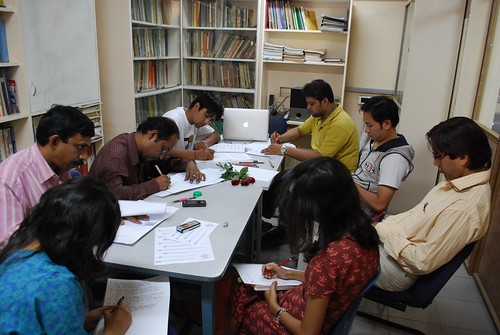
NewConceptInfo_Research&DesignTeam02

I’ve spent more than 15 years teaching creative-professionals some of the most advanced techniques and technologies behind the latest graphic-design, audio, and video software and hardware. My heart, though has always been more keen on pure design and creativity. Long ago, I recognized the real bottleneck is neither in hardware or software, but in creativity. I call this the ‘blank screen’ syndrome. You get yourself the most powerful computer system with advanced components and peripherals; feature-rich and overwhelming authoring software, only to panic as you stare at an empty digital canvas for several awkward minutes, wondering what to do.

It Can Only Be Caught

At long last, my clients have also started to acknowledge this as their real problem and have started to ask me to focus on deeper and more fundamental disciplines. How to author anything that resonates with aesthetic beauty and creativity is indeed challenging. Teaching others how to do this is exponentially more challenging and exciting. It can’t be taught. It can only be caught.

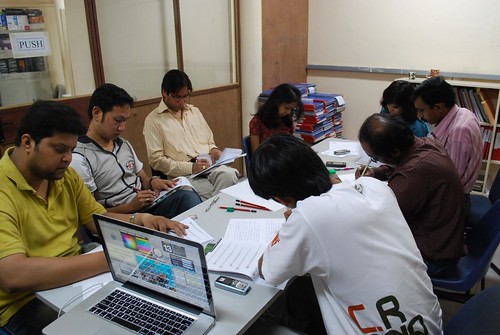
NewConcept is one of my clients bold enough to move in this direction. I’ve been training and consulting them in technology from time-to-time since circa 1998. A couple of my students have also worked with them on design projects through these years. Finally, in October last year, they invited me to professionally mentor their Research and Design team.

Crystal-Ball of Creativity

The mentorship program covers almost all disciples of design, creativity and media. Some sessions have been devoted to typography and publication-grid and design. Others on color-theory, color-schemes and trends. The team’s also honing its skills in photography and building a large in-house library of photos and images. We’ve covered digital print-production, and several sessions have focussed on the latest trends and techniques in web-design and user-interface. Together with the client-coordination team, we’ve also discussed pre-press and production technology. In almost every session we brainstorm on new and ongoing client projects. Plus, we also set up and fine-tune systems and processes for client-servicing, briefing, and profiling. Once in a while I’ve also delved into new features and technologies in the latest design software.

NewConceptInfo_Research&DesignTeam01

Personal Challenges

At a professional level, combining creativity with people-skills is indeed quite exciting. Nurturing talent demands a lot of effort and sensitivity, and every insight shared needs to be backed with solid research and references. I spend hours scouring bookshops, libraries, and online resources to compile my references. In the process, am helping build a growing in-house library of reference, imagery, and color trends.

Am blessed to work with a team of devoted professionals each with several years of experience. So far, they’ve always strived to fulfill their clients’ objectives. Personally though, I wish for them to break out of this mould and take a quantum leap in their creative aspirations. I wish for them to study and absorb the latest and most daring design trends; work on creating their own unique signature style; and usher in a fresh vision on design and creativity in their domain. I want the entire organization to start thinking in terms of design and aesthetics. And, along the way, I want them to win several international awards and recognitions.

We certainly have a long way to go. The inspirations and standards I’ve set for them at times seem impossible. I merely chuckle. The initial six months of hard-drilling have started to bear some fruit. We’ve at least sorted out our color-moods and palettes. The team’s always eager to plug into its own photo bank for imagery. We’ve started to roll out a new branding and identity which may take a few more months to percolate down. Some of the newer web-design projects are significantly far-ahead of their earlier predecessors. The greatest challenge though, is to master typography with all its complex nuances. No trivial feat this, but after several months of trying I’ve finally devised a better pedagogy to achieve this.

Finally, all this work is only possible thanks in turn to all my gurus of design. To learn is to share, and vice-versa.

[ends]

JavaFX: Like Flash with Freedom

Friday, December 5th, 2008

The Distant Thunder of Freedom Shall Liberate You From Flash

Do you watch videos on the web and stream them to your mobilephone? Are you addicted to YouTube, and love playing Flash-games on your mobilephone? Or like me, are you fascinated and work in the bleeding-edge discipline of Graphic User Interface (GUI) design of web-applications, or any other user-interface?

Time for you to taste the thunder. Discover JavaFX, the new and highly-sophisticated Flash-killer from Sun Microsystems. This will change the look-and-feel of everything on desktops, the web, and the mobile, ushering in a hopefully beautiful, rich, internet experience. This is going to be the future of New Media.

Check out the galleries of what it may do, here:
javafx.com/samples/index.html

So far, their kits are available for Mac and Win, though a Linux version may just come in anytime soon. I did manage to view the samples above in my firefox running Ubuntu Linux. Will write more about this soon. Stay tuned.

[ends]


is proudly powered by WordPress
Entries (RSS) and Comments (RSS).


© www.niyam.com